One shared grocery list. Fewer “did you get milk?” messages.
The person who notices the empty carton isn't always the person going to the store. Mana gives your household a shared shopping list, so what you need is ready when someone is ready to shop.
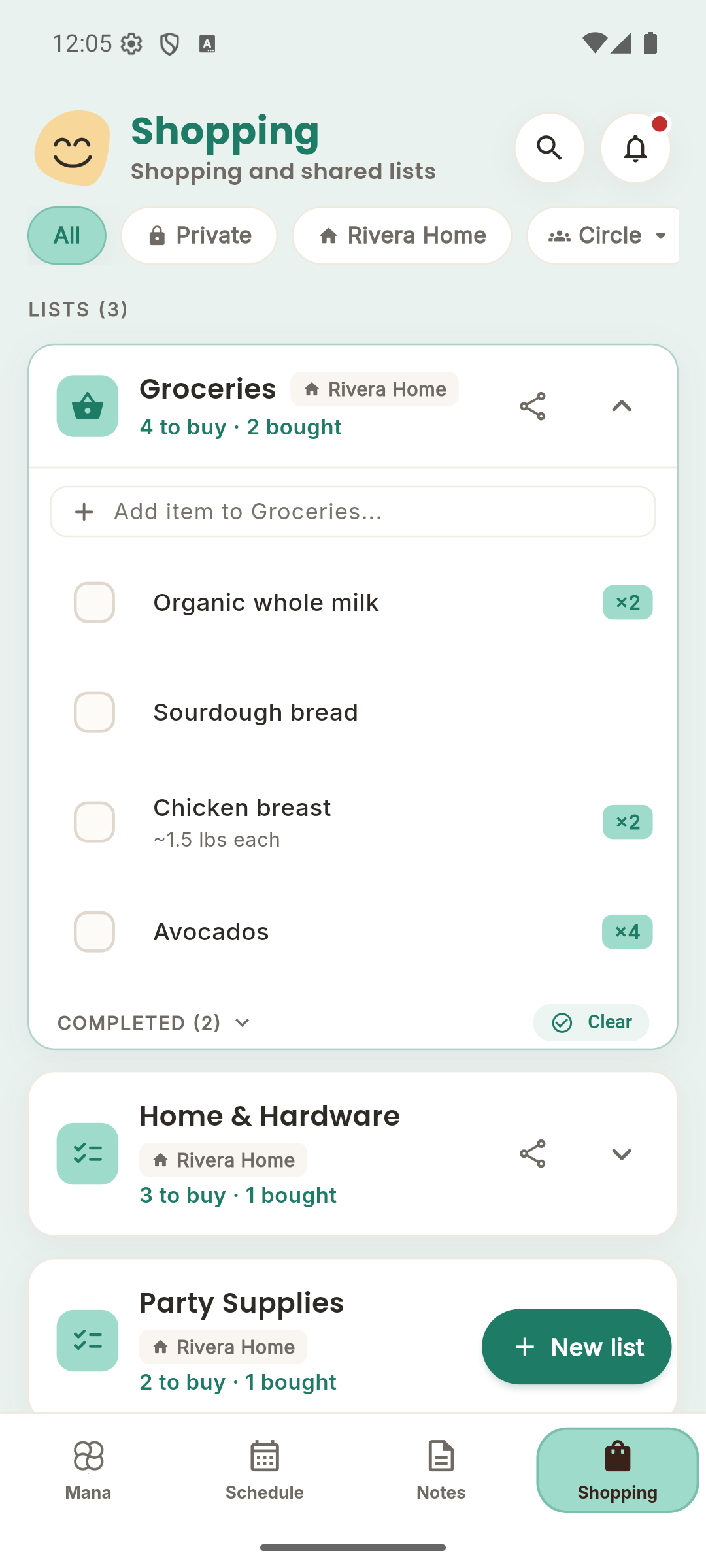
Catch the little things before you forget.
Add groceries when you use the last one, whether you're in the kitchen or away from home. Keep separate lists for different shopping trips and share the household list with the people who actually use it.
Shop from the same list.
Household members can add items and check them off as they shop. Changes sync between devices when connected, so an updated list is easier to follow than a stream of messages or a photo of yesterday's paper list.
Keep the supermarket trip organized.
Add quantities and notes so the next person knows how much to buy. Keep groceries separate from a hardware run or party supplies with multiple lists. Completed items are set apart from what you still need, so the next purchase is easy to spot.
Start with this week.
- Create a household and invite your shopping partner or roommates.
- Open Shopping and add the staples you need on your next trip.
- Use the shared list in the store and check items off as you go.
A few things to know.
Does it work for roommates?
Yes. Use a shared household list for things everyone uses, and Private for your own items.
Can one person use an iPhone and another Android?
Yes. Your shared lists work across iOS, Android and the web.
Can I ask Mana to add groceries?
Yes. In the Mana tab, ask the assistant to add groceries to the appropriate list. Be specific about the list when you have more than one.
Bring the rest of the week together.