A shared family calendar for the week you actually have.
School pickup, a dentist appointment, dinner, the bins: family plans rarely fit into just one kind of list. Mana brings events, tasks and meals into Schedule so your household can see what needs to happen next.
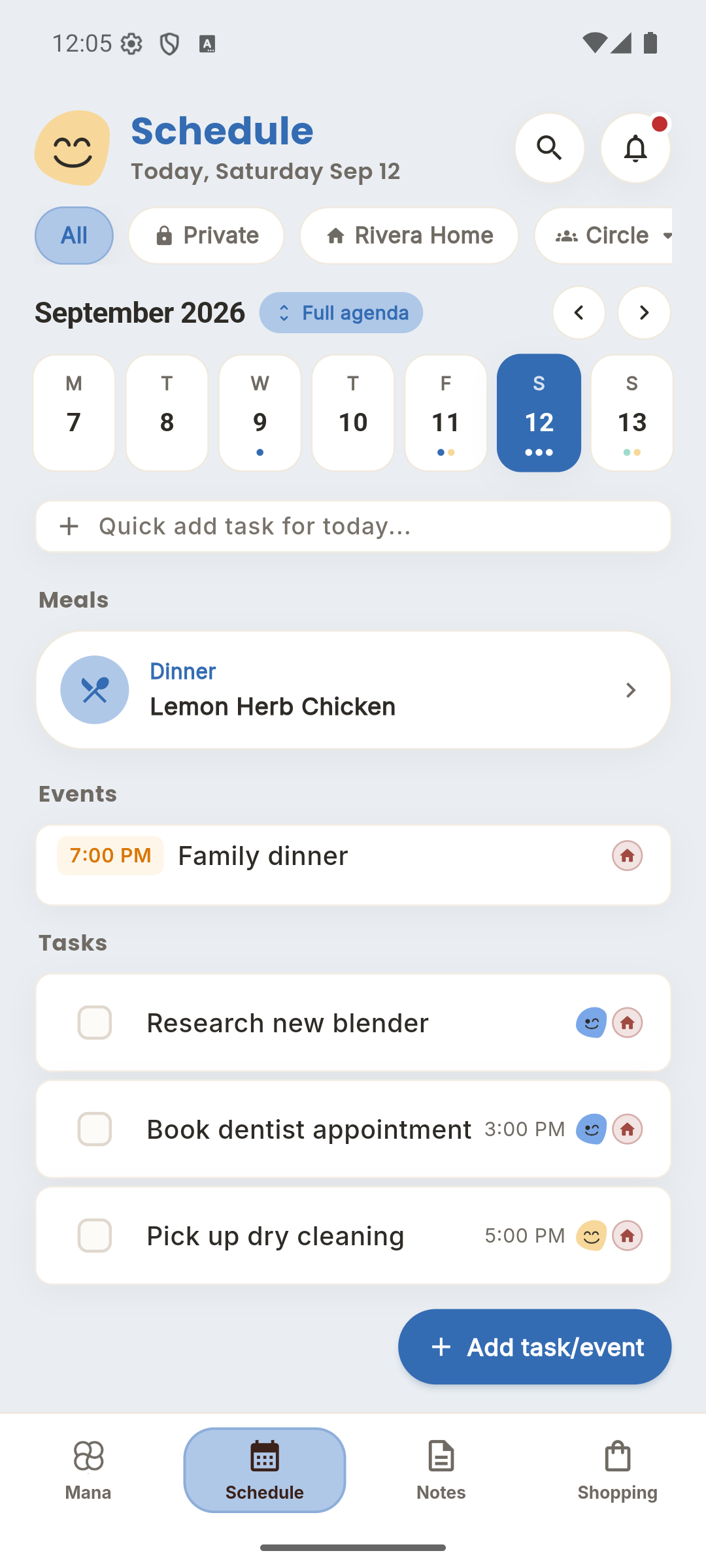
Give the week one place to live.
Add the events everyone needs to know about to your household. The weekly view makes it easier to check what's coming up before agreeing to another plan. Keep your own items in Private when they do not belong on the shared schedule.
Make the next step someone's task.
An event tells you what's happening; a task tells you what needs doing. Add a deadline, assign the task to a household member and set a reminder. School on Friday can sit beside the task to pack the sports kit on Thursday.
Let dinner be part of the day.
Meal plans live in Schedule alongside the rest of family life. Put a quick dinner on the busy evening and save the longer recipe for a quieter day. Recipes stay in Notes, with groceries in Shopping.
Start with this week.
- Create your household and invite someone you plan with.
- Add this week's fixed events, then the chores that need an owner.
- Choose a dinner for the busiest night and review the week together.
A few things to know.
Can we use different phones?
Yes. Mana is available on iOS, Android and the web, so household members can use the device they already have.
Is this only for parents?
No. Couples, roommates, grandparents and caregivers can coordinate together. Invite people to the Circle relevant to them rather than sharing your whole household.
Where do my private tasks go?
Keep them in Private. Choose the household or another Circle for items you want to coordinate with others.
Bring the rest of the week together.